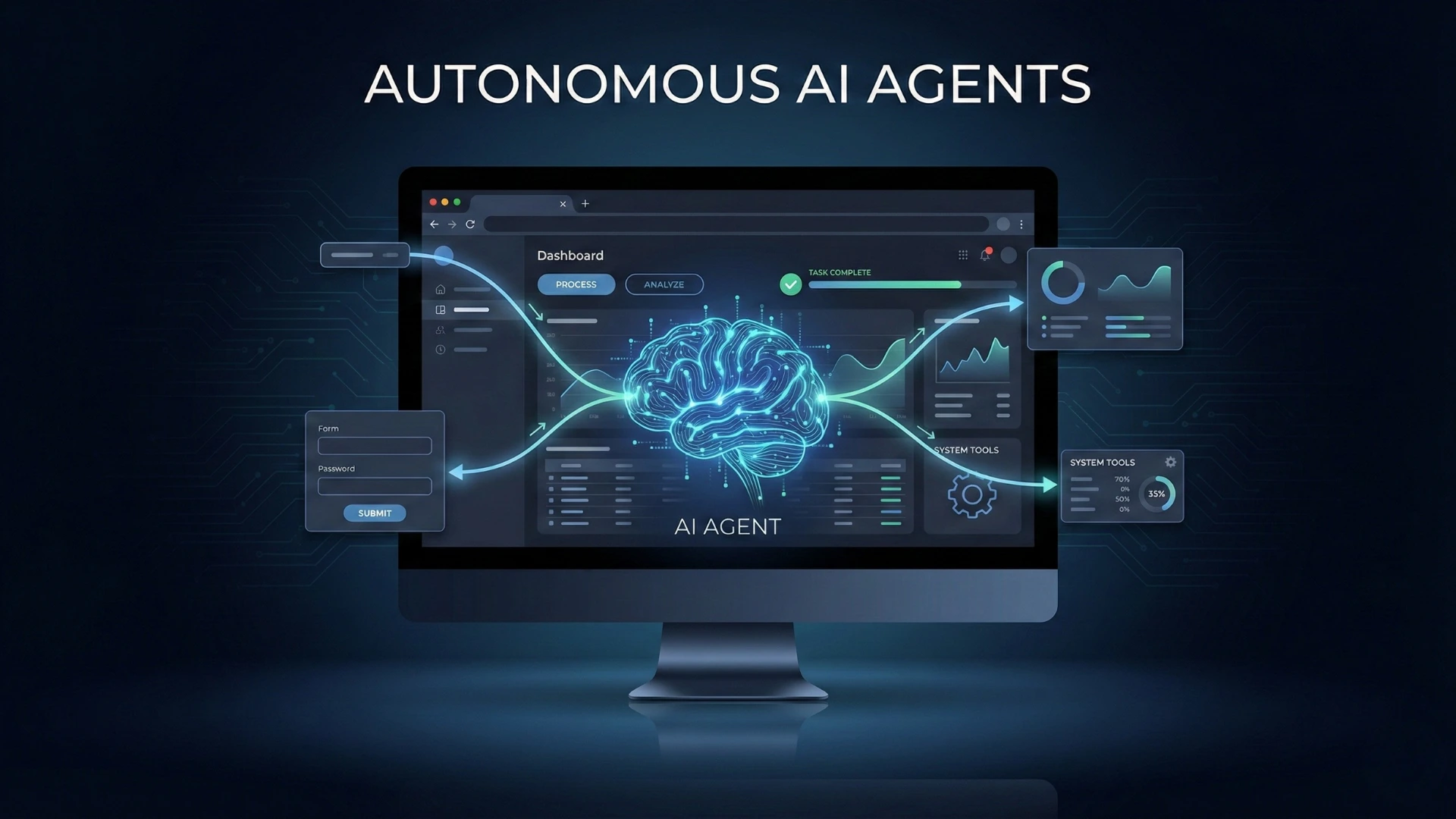




Modern artificial intelligence has moved far beyond static chatbots and single-prompt interactions. Today’s most capable systems are autonomous AI agents AI systems that can reason, plan, take actions, use tools, interact with software interfaces, and adapt over time with minimal human intervention.
What distinguishes an autonomous AI agent from a traditional language model is not intelligence alone, but agency. These systems do not simply generate text; they decide what to do next, execute actions in the real or digital world, observe outcomes, and adjust their behavior accordingly.
At the center of this evolution are computer use and browser use capabilities that allow AI agents to operate directly inside operating systems, applications, and the web itself when APIs are unavailable or insufficient.
What Are Autonomous AI Agents?
An autonomous AI agent is a software system that can pursue goals independently by combining reasoning, memory, tool use, and action execution.
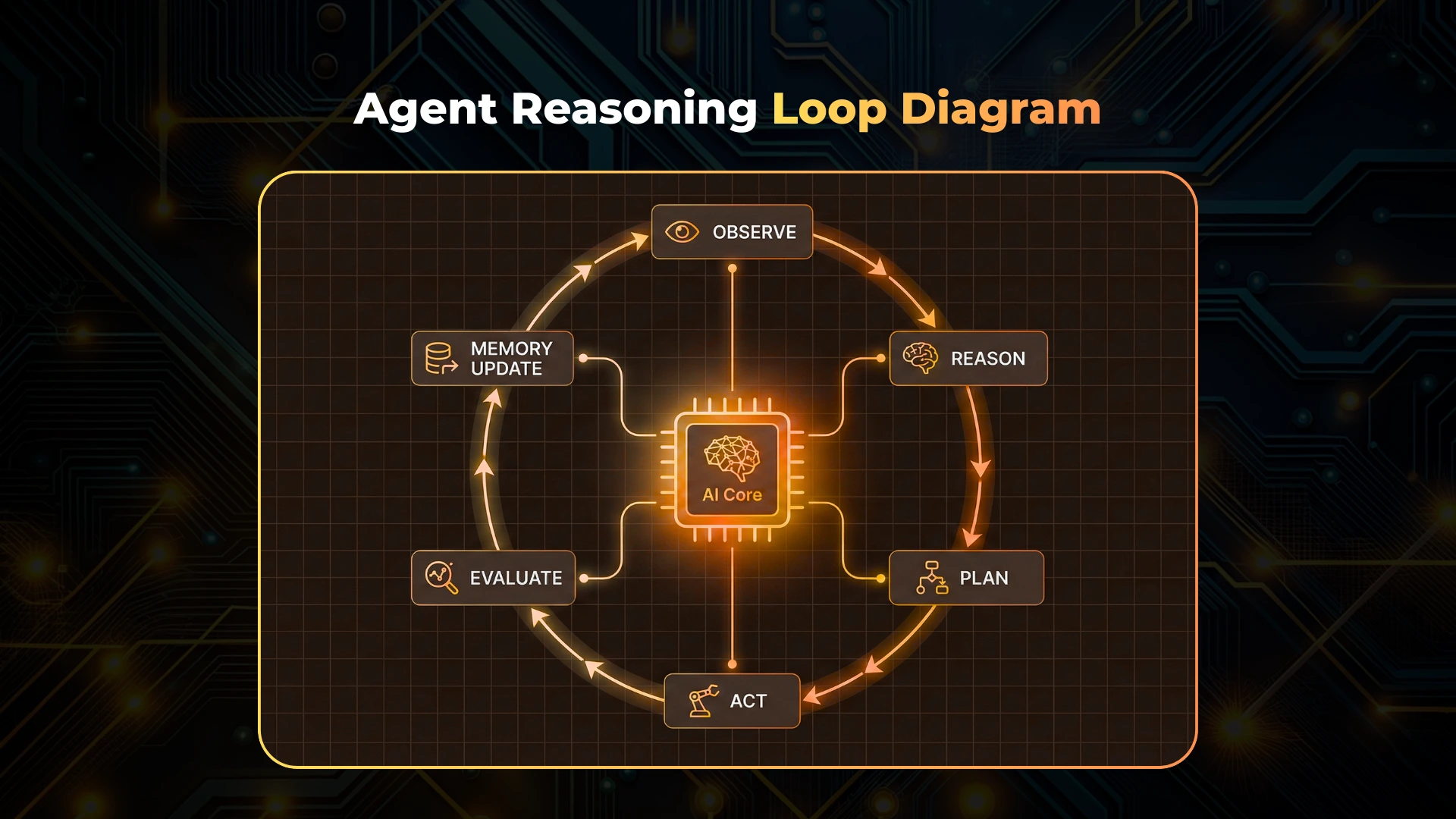
Unlike chat-based AI, which reacts to a single prompt and stops, an autonomous agent operates in a loop:
- Observe the current state of the environment
- Reason about goals and constraints
- Plan one or more actions
- Act using tools, software, or interfaces
- Evaluate results and update memory
- Repeat until the goal is achieved or conditions change
This closed feedback loop allows agents to handle long-running tasks, multi-step workflows, and dynamic environments.
Autonomous Agents vs Chatbots vs Scripts
- Chatbots generate responses but do not act.
- Scripts and automation follow fixed rules and break when conditions change.
- Autonomous AI agents adapt, recover from errors, and decide what to do next.
Autonomy does not mean randomness. Well-designed agents operate within defined boundaries, guardrails, and policies.
Core Capabilities of Autonomous AI Agents
Autonomous agents are not defined by a single feature but by a set of integrated capabilities that work together.
Reasoning and Planning
Agents break high-level goals into smaller tasks, evaluate possible approaches, and choose sequences of actions. This often involves:
- Task decomposition
- Decision trees or graphs
- Iterative planning and replanning
- Cost and risk evaluation
Planning is continuous, not one-time.
Tool Use and External Actions
Agents extend beyond language by invoking tools such as:
- APIs
- Databases
- Code execution environments
- Cloud services
- Internal business systems
Tool use allows agents to retrieve data, modify systems, and affect real outcomes.
Memory and Knowledge Retrieval
Because language models are stateless, agents rely on external memory systems to store and retrieve information, including:
- Short-term working memory
- Long-term semantic knowledge
- Episodic memory of past actions and outcomes
This enables learning, consistency, and contextual awareness across sessions.
Computer Use: Interacting With Software Like a Human
Computer use allows AI agents to operate directly inside desktop environments and applications by:
- Interpreting screenshots or UI states
- Moving the mouse and typing on the keyboard
- Clicking buttons and navigating menus
- Executing workflows in software without APIs
This capability is critical when systems lack programmatic interfaces or when automation must work across heterogeneous tools.
Computer-using agents rely on vision-based perception, multimodal reasoning, and action execution, making them fundamentally different from traditional automation.
Browser Use: Navigating and Acting on the Web
Browser-using agents can:
- Search the web
- Navigate complex websites
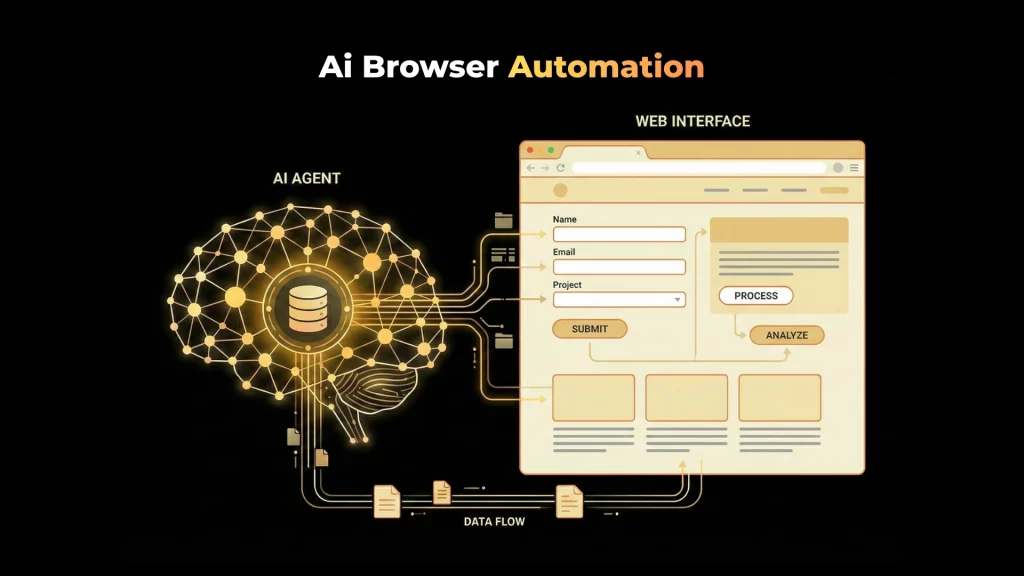
- Fill forms and submit data
- Interact with JavaScript-heavy interfaces
- Handle authentication flows
Browser use enables agents to perform tasks such as research, data collection, competitive analysis, QA testing, and operational workflows that were previously manual.
How AI Agents Use Computers in Practice
Computer use typically follows a perception–action loop:
- The agent receives a screenshot or UI state
- It reasons about what is visible and what needs to be done
- It decides where to click, scroll, or type
- The action is executed
- The new state is observed
This loop repeats until the task is completed.
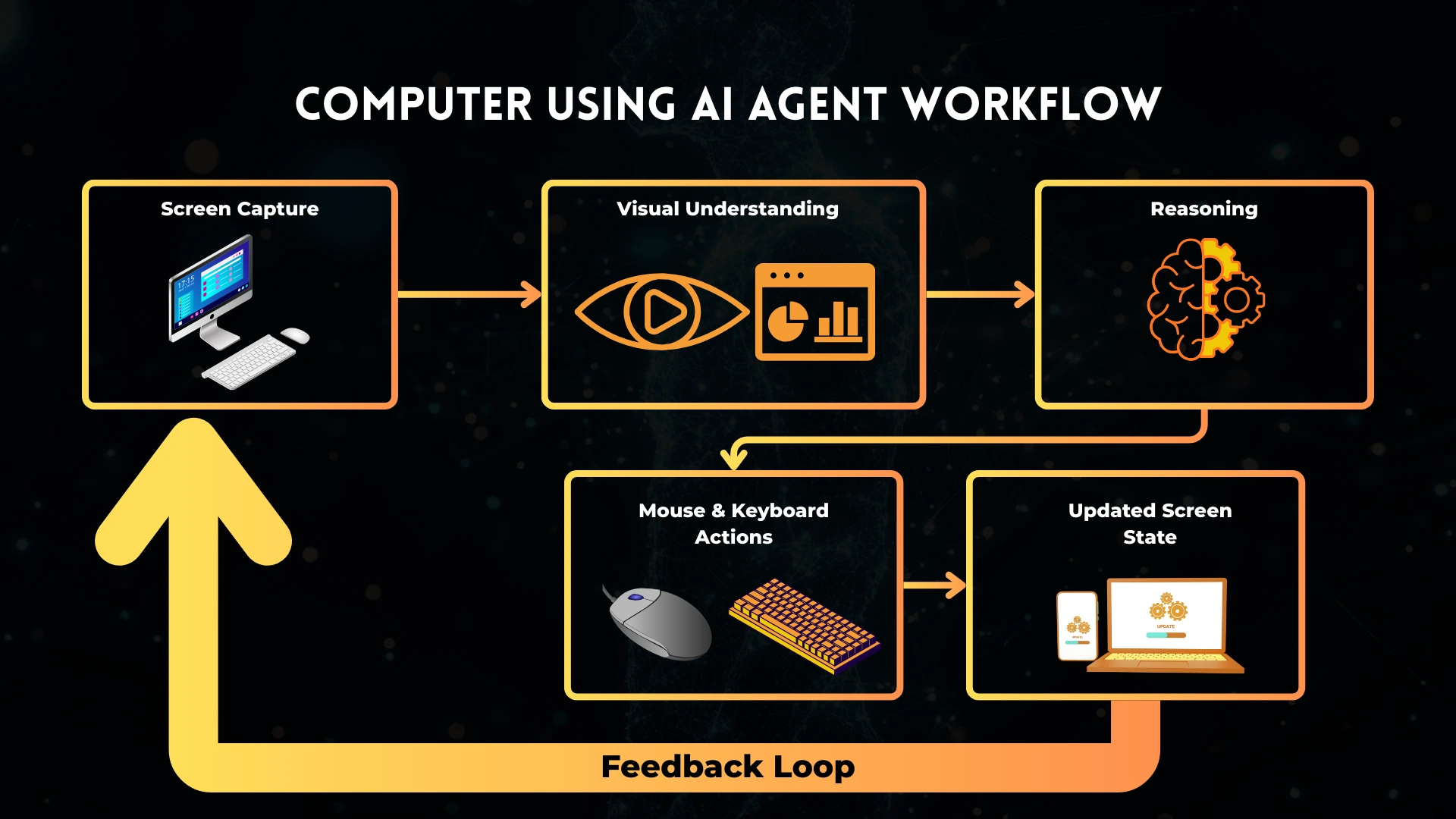
Unlike traditional robotic process automation (RPA), AI agents do not depend on brittle selectors or fixed scripts. They reason about the interface visually and conceptually, allowing them to handle layout changes and unexpected states more gracefully.
Browser-Using AI Agents and Web Interaction
Browser agents are a natural extension of computer-using agents, specialized for web environments.
They are particularly effective when:
- APIs are unavailable or incomplete
- Data is distributed across many sites
- Interfaces change frequently
- Tasks require interpretation, not just extraction
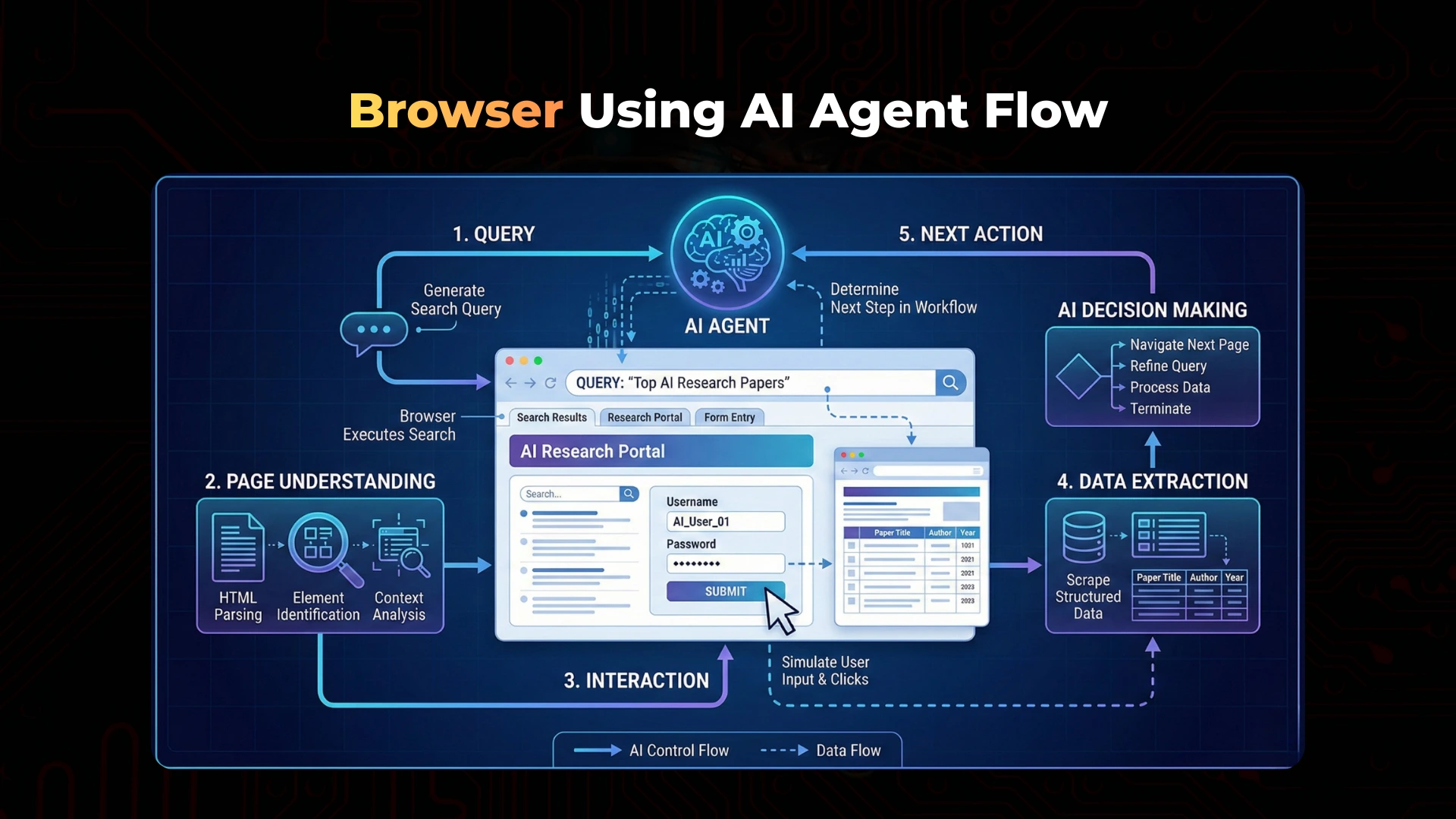
Modern browser agents combine:
- Vision-based page understanding
- DOM awareness
- Semantic reasoning
- Error recovery and retries
This makes them suitable for real-world web automation rather than fragile scraping scripts.
Architectures Behind Autonomous AI Agents
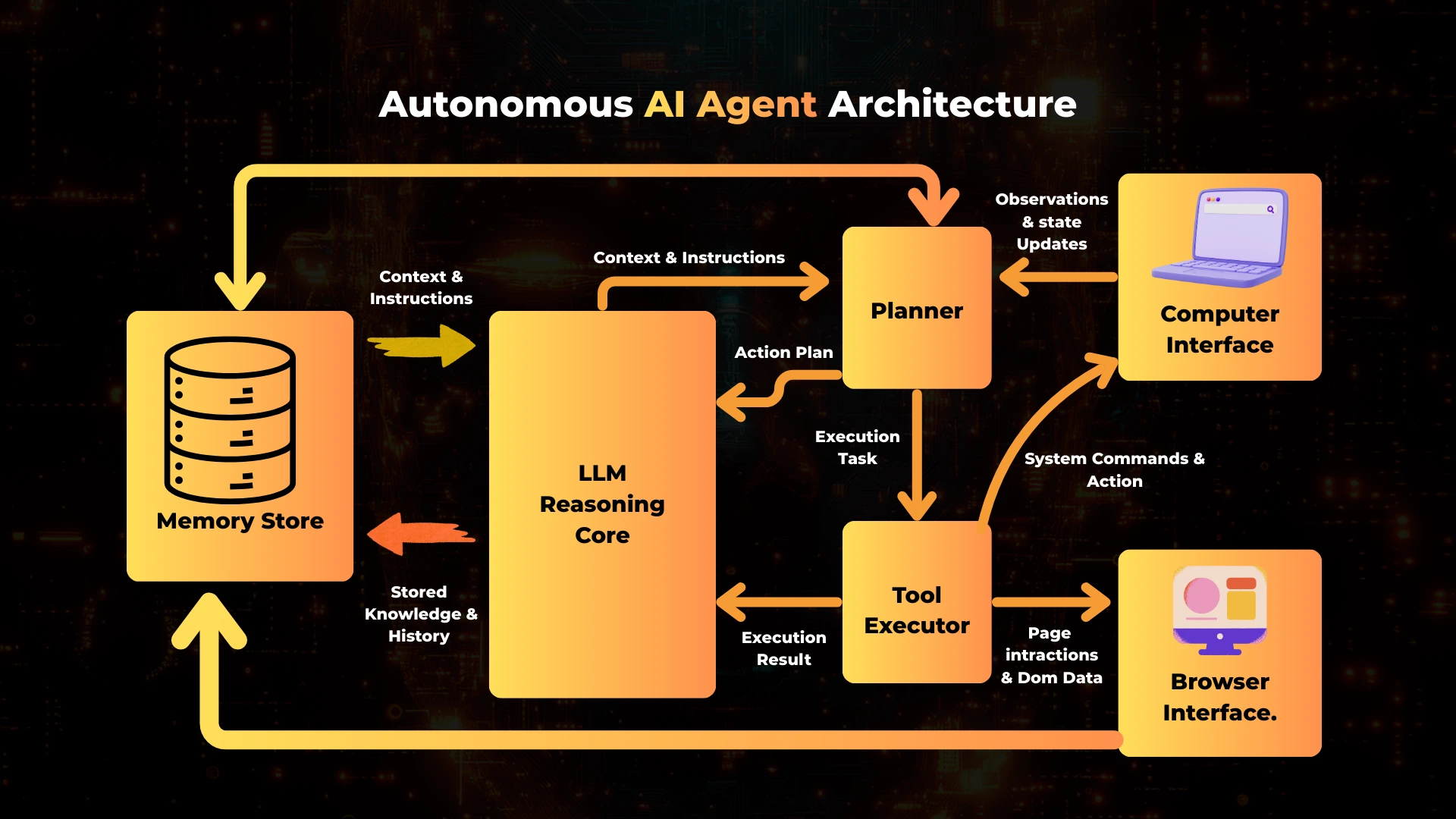
The behavior of an agent is determined by its architecture.
Single-Agent Architectures
A single agent handles perception, reasoning, memory, and action in one loop. This approach is simpler and works well for focused tasks.
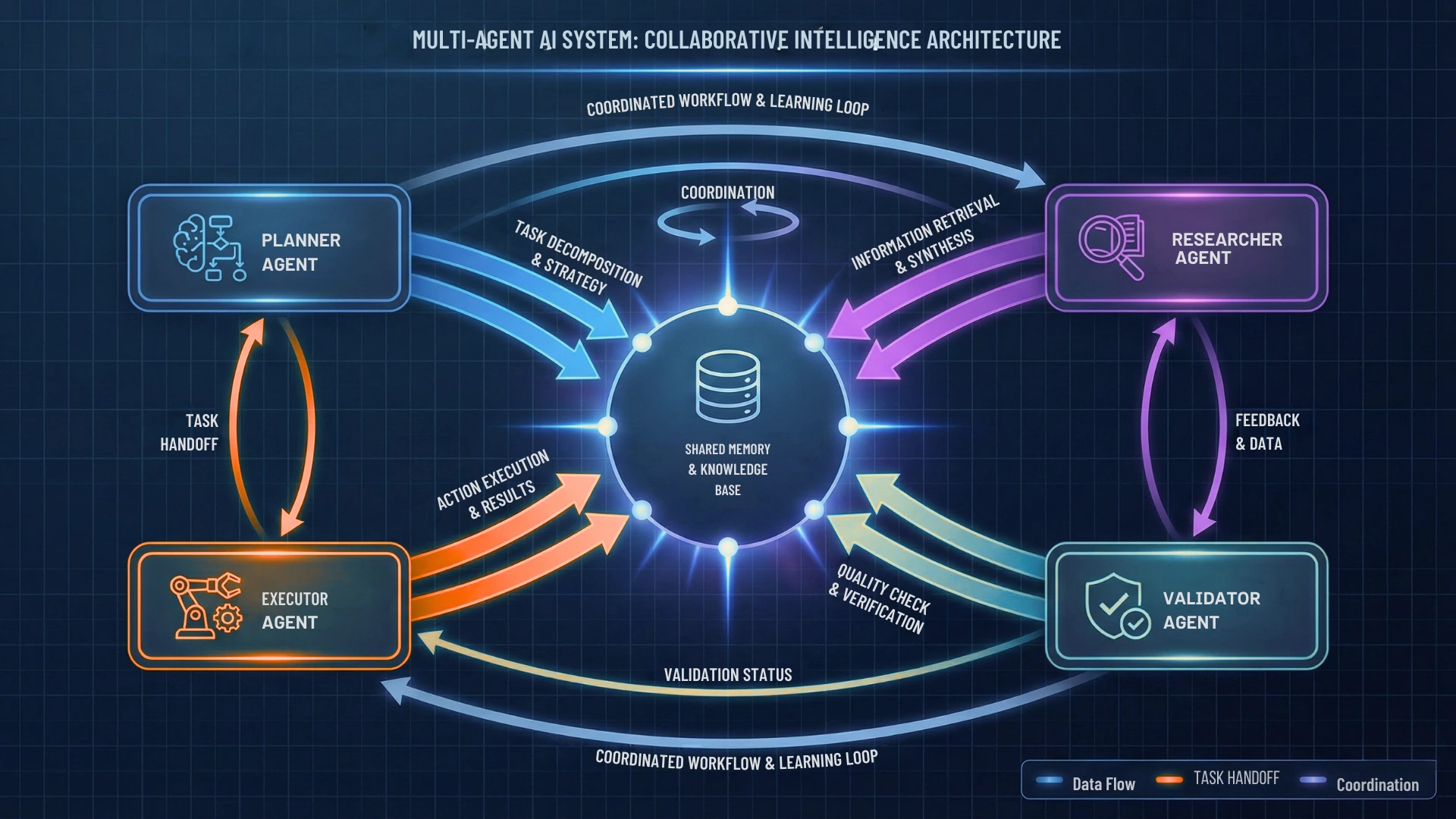
Multi-Agent Systems
More complex systems distribute responsibilities across multiple agents, such as:
- Planner agents
- Research agents
- Execution agents
- Validation agents
Agents coordinate through shared memory or messaging, enabling parallelism and specialization.
Orchestration Frameworks
Frameworks such as LangGraph, CrewAI, and LlamaIndex provide structure for:
- Defining agent workflows
- Managing state transitions
- Handling retries and failures
- Coordinating multiple agents
Orchestration is essential for reliability and observability in production systems.
Real-World Use Cases of Autonomous AI Agents
Autonomous agents are already being used in production for:
- Web automation where APIs do not exist
- Software testing and QA
- Research and competitive intelligence
- Customer support triage and resolution
- Internal operations and workflow automation
- Data validation and reporting
The strongest use cases are those where tasks are repetitive but require judgment, context, or adaptation.
Limitations, Risks, and Guardrails
Autonomous AI agents introduce new risks that must be managed carefully.
Key Limitations
- UI-based actions can be slower than APIs
- Visual ambiguity can lead to incorrect actions
- Latency increases with multi-step reasoning
Risks
- Unintended actions in sensitive systems
- Security and access control concerns
- Hallucinated decisions when context is missing
Mitigations
- Human-in-the-loop approval for critical actions
- Action sandboxing and permissions
- Logging, tracing, and replayability
- Validation steps before irreversible actions
Autonomy should be gradual and controlled, not absolute.
Autonomous AI Agents vs Traditional Automation
Traditional automation excels when processes are stable and predictable. Autonomous agents excel when processes are dynamic, ambiguous, or constantly changing.
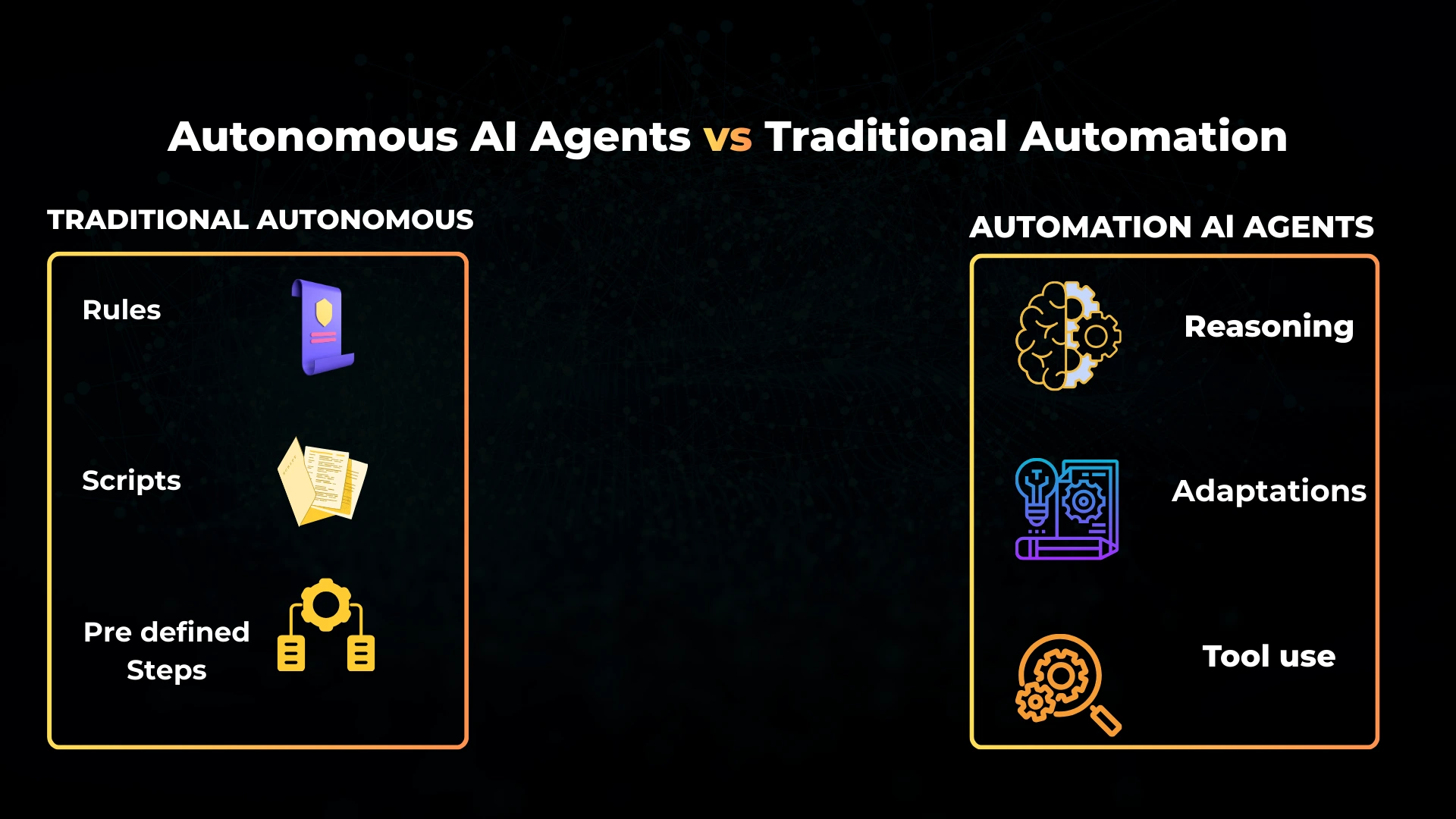
| Capability | Traditional Automation | Autonomous AI Agents |
|---|---|---|
| Adaptability | Low | High |
| Error recovery | Manual | Built-in |
| UI handling | Fragile | Vision-based |
| Decision-making | Rule-based | Reasoning-based |
| Maintenance cost | High over time | Lower with learning |
When Should You Use Autonomous AI Agents?
Autonomous agents are most effective when:
- APIs are unavailable or incomplete
- Tasks change frequently
- Human judgment is normally required
- Workflows span multiple tools or interfaces
They are not ideal when:
- Deterministic APIs already exist
- Tasks require strict real-time guarantees
- Errors are unacceptable without review
Choosing the right tool for the job is critical.
The Future of Autonomous AI Agents
The trajectory is clear:
- Deeper multimodal reasoning
- Safer and more controllable action policies
- Better long-term memory integration
- Improved self-evaluation and correction
- Broader enterprise adoption
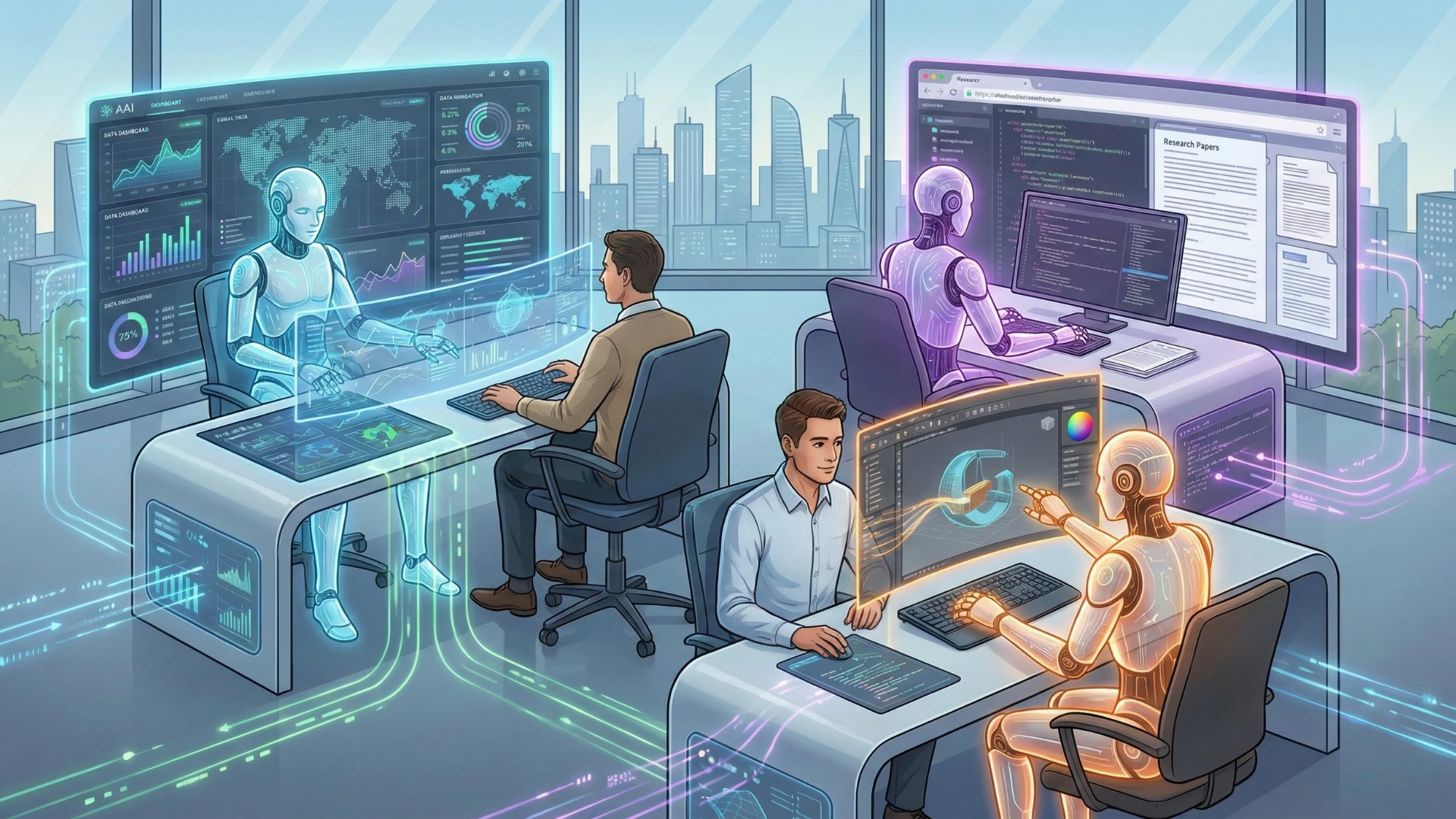
As these systems mature, autonomous agents will increasingly operate as digital coworkers, handling complex workflows under human supervision rather than replacing humans outright.
Conclusion
Autonomous AI agents represent a fundamental shift in how software systems operate.
By combining reasoning, memory, tool use, computer interaction, and browser navigation, they move AI from passive response generation to active problem-solving. Computer and browser use are not optional features; they are core capabilities that allow agents to function in the real, imperfect environments where most work actually happens.
Organizations that treat agents as full systems designed with architecture, guardrails, and observability will build AI solutions that are more resilient, more useful, and more aligned with real-world needs.
Frequently Asked Questions
Autonomous AI agents are AI systems that can reason, plan, act, and learn independently to achieve goals. Unlike traditional AI models that only generate text, autonomous agents can interact with tools, software interfaces, browsers, APIs, and environments to complete multi-step tasks without constant human input.
Autonomous AI agents use computers and browsers by:
- Navigating web pages
- Clicking buttons and forms
- Reading and extracting information from screens
- Filling inputs and submitting actions
- Interacting with desktop or web applications
This capability allows agents to operate in real-world digital environments designed for humans, not just APIs.
Computer use refers to an agent’s ability to interact with a graphical user interface (GUI)—such as a browser or operating system—using vision, reasoning, and action loops. Instead of calling an API, the agent observes the screen, decides what to do next, and performs actions like clicking, typing, or scrolling.
Browser use enables AI agents to:
- Search the web
- Open and read webpages
- Navigate multi-step workflows
- Extract structured and unstructured data
- Perform tasks on websites that don’t provide APIs
This is essential for automation in environments where APIs are unavailable or limited.
Traditional automation follows fixed rules and scripts. Autonomous AI agents:
- Adapt to new situations
- Handle unexpected UI changes
- Reason over incomplete information
- Choose tools dynamically
- Recover from errors without hard-coded rules
This makes them far more flexible and resilient than rule-based automation systems.
Computer-using AI agents solve problems such as:
- Automating repetitive browser tasks
- Navigating legacy systems without APIs
- Performing research across multiple websites
- Managing workflows inside SaaS dashboards
- Acting as digital assistants for complex operations
They are especially useful where manual human interaction was previously required.
Popular frameworks include:
- OpenAI (computer-use & tool use APIs)
- LangGraph (stateful agent workflows)
- CrewAI (multi-agent collaboration)
- Semantic Kernel (enterprise orchestration)
- Playwright / Selenium (browser control layers)
These frameworks provide the infrastructure needed for reliable agent execution.
Common use cases include:
- Web research and competitive analysis
- Customer support automation
- Internal operations automation
- Data entry and system reconciliation
- Monitoring dashboards and reports
- QA testing of web applications
As agents mature, they increasingly replace manual digital labor.
No. One of the biggest advantages of computer and browser use is that agents do not require APIs. They can operate directly through user interfaces, making them compatible with almost any software system.
Autonomous agents rely on:
- Observation–Reasoning–Action loops
- Visual understanding of interfaces
- Retry and recovery logic
- State tracking across steps
This allows them to adapt when buttons move, layouts change, or unexpected errors occur.
Autonomous AI agents are not direct replacements for traditional RPA—but they extend and surpass RPA in complex, dynamic environments. While RPA excels at predictable workflows, agentic systems handle uncertainty, reasoning, and adaptation far better.
Autonomous AI agents are valuable for:
- Developers building intelligent automation
- Businesses optimizing operations
- Researchers running complex workflows
- Product teams managing digital systems
- Enterprises adopting agentic AI architectures
They are especially impactful where manual digital work dominates.
Building autonomous agents typically requires:
- Understanding of LLMs and reasoning patterns
- Knowledge of tool use and orchestration
- Experience with browser automation
- Awareness of safety and governance controls
- System-level thinking rather than prompt engineering alone